Construction project management software
Construction project management for site and office
Plan quantities, control project costs, record daily site work, prepare progress payments and view IFC models in one workspace built for construction teams.
- First user of every project is free
- Runs in the browser — nothing to install
- Excel import & export for quantities and contracts

Progress payments
Never prepare the same payment twice
Work done on site adds itself up. Enter what was built and the client progress payment, the earned revenue and the remaining contract value are all calculated from the same numbers — no spreadsheet to reconcile at month end.
- Client and subcontractor payments come from the same measured quantities, so they can never drift apart
- Previous periods are remembered — you only enter what was done this month
- Export the payment the day the work is measured

3D model · IFC
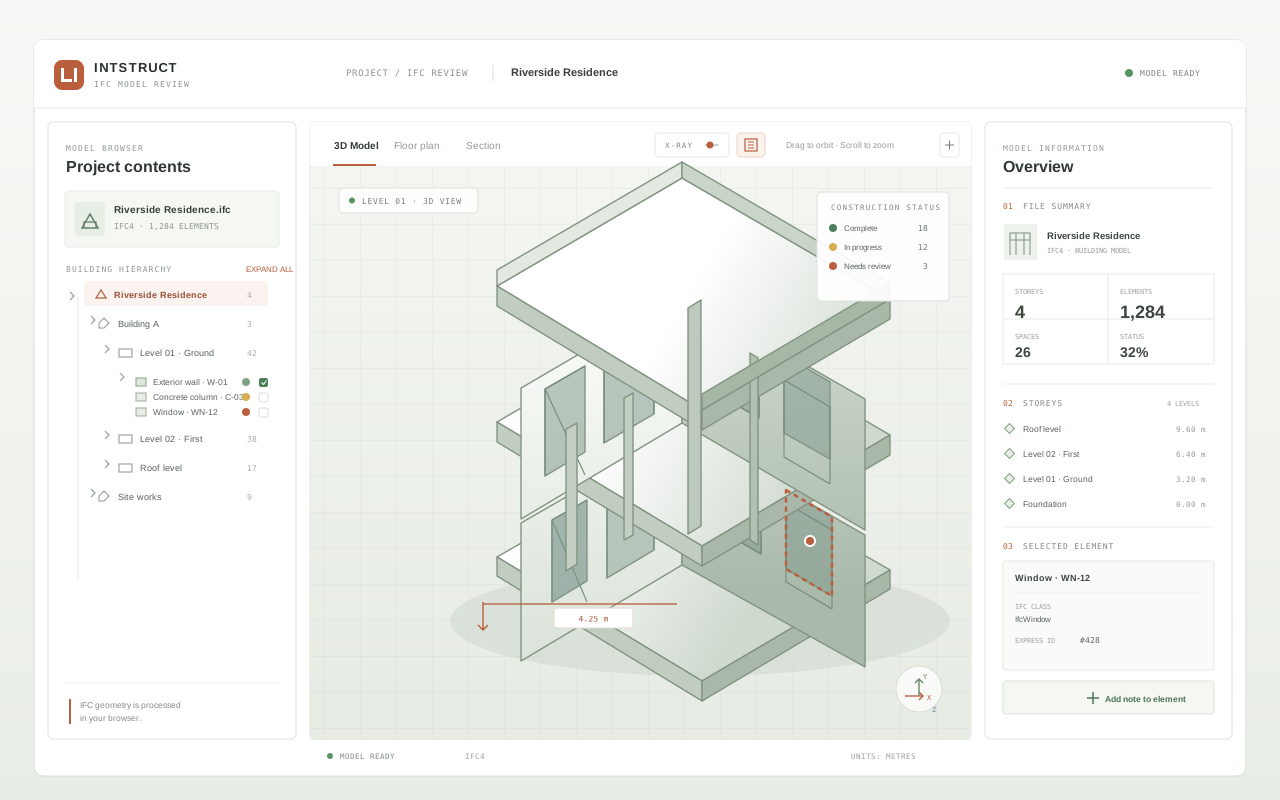
Open the model on site, not only in the office
The building’s IFC model opens right in the browser. Measure an element on site, pin a note to it, and the next person finds your note in exactly the same place — no desktop software, no downloads.
- IFC models open in the browser — nothing to install
- Measure and mark elements without leaving the page
- Notes and measurements stay attached to their element
Field data
Let the site write its own daily report
Labour, equipment, materials, progress and expenses are entered from a phone, where the work happens. Every record lands on the right budget line, so the office sees real figures — not a late summary.
- Daily labour and equipment records feed cost control automatically
- Entered on site, not compiled afterwards
- Photos and documents stay attached to the day they belong to

Cost control
Learn the cost while you can still act
Budget, actual and committed costs sit side by side for every item. When a line starts drifting from plan, the dashboard says so while there is still time to intervene — not after the invoice arrives.
- Budget, actual and committed cost per item, with the variance next to them
- Earned-value metrics (CPI, SPI) flag a drifting item early
- Cash-flow curves can be drafted straight from the work schedule

Product tour
See one project come together
A narrated tour from planning and site records through IFC, cost control, and reporting.
Key features
One workspace, every module
Every module reads the same project records: data is entered once — usually on site — and is reused everywhere else.
Quantity take-off
Budget control
Cash flow
Progress payments
Field data
Cost entry
Manhour analysis
Schedule
3D IFC viewer
Quality & HSE
Contracts & claims
Procurement & stock
Reports
AI assistant
Why intstruct
Built around how a construction project actually runs.
One record, not eleven spreadsheets
Written for the people doing the work
Your records stay yours
Free to start, fair to grow
Frequently asked questions
Is intstruct used on site or in the office?
Both. Field screens are filled in from a phone: daily labour, equipment, progress and expense records. On the office side, the same records turn into budgets, cash flow and progress payments automatically. Data is entered once, on site, and used everywhere.
Can I move my existing project over from Excel?
Yes. Quantities can be typed in or imported with the Excel-compatible template you can download from the app, and contracts can be imported from a CSV file. After the move, everything is updated inside intstruct.
Are progress payments really calculated automatically?
Yes. Measured quantities multiplied by the contract unit prices produce the payment, the earned revenue and the remaining contract value. Client and subcontractor payments read the same quantities, so the two can never disagree.
What do I need to view the 3D model?
Just a browser. IFC models open without any desktop software. You can measure elements and pin notes to them; the notes stay attached to the element for the next person who opens the model.
How does pricing work?
The first user of every project is free. Each additional user in the same project costs 10 USD per month. There is no fixed term and no hidden fee — the price simply follows your user count.
Where is my data stored, and is it safe?
Records are stored per project and stay reachable for the life of the contract. When you need to prove what was measured and when, the history is at hand. Role-based permissions and an authorization matrix are available for larger organisations.
Do we need training to get started?
No. The built-in user guide walks through every module step by step — from creating the project to exporting a report — in plain language written for site engineers and project managers.
What does the AI assistant do?
It answers questions about your own project: progress, costs and records. You pick the provider and paste your API key, which stays on your device.
How large can my files be?
PDF documents such as specifications upload up to 40 MB each, which covers even long tender volumes. IFC models are accepted up to 4 GB by default, so a full building model fits without splitting.
Does intstruct work offline on site?
The app needs an internet connection today. On sites with weak reception, a phone hotspot is enough for daily records — they are small text entries, not heavy file transfers. Offline queueing of field records is on the roadmap.
Can I export my data?
Yes. Quantities export back to Excel-compatible files, and reports are produced as PDFs you can file or forward. Your data is yours: what you enter on site can always leave the system in a standard format.
Start with your current project
The first user of every project is free. Create an account and open your first project — or read the documentation first if you would rather look around.